


When it comes to electrical work or networking installations, knowing how to properly terminate fixture joints is essential. Not only does it ensure everything runs smoothly, but it also keeps you safe and helps avoid costly mistakes down the road. In this guide, we will learn the step-by-step process of fixture joint termination, covering the tools you need, the methods you can use, and some common mistakes to avoid. Let’s get started!
What is Fixture Joint Termination?
Before diving into the “how-to,” let’s make sure we’re clear on what fixture joint termination actually is. In simple terms, it’s the process of connecting wires to a fixture, ensuring they are secure, insulated, and ready to carry electrical current. Whether you’re setting up light fixtures, connecting network cables, or working on more complex installations, this process is a fundamental part of any project.
Fixture joint termination comes in different forms, depending on what you’re working with. For example, you might be terminating electrical joints in a lighting fixture or creating cable joints for a network installation. The end goal is the same: a solid, safe, and effective connection.
Types of Fixture Joint Terminations
There are several methods for terminating fixture joints, and the one you choose depends on the project at hand. Here are some common ones:
- Mechanical Termination: This involves using connectors or clamps to secure the wires. It’s often used in both electrical and network installations.
- Soldering: For a more permanent connection, soldering is used. This method involves melting a metal alloy to join the wires together. It provides a strong connection but requires some skill.
- Crimping: This is common in electrical work, where a crimping tool is used to secure connectors to the wire.
Each method has its strengths, and the one you pick should align with your specific project needs. For instance, soldering is excellent for permanent connections, while mechanical termination is often easier and more flexible.
What is a Keystone Jack Termination Fixture?
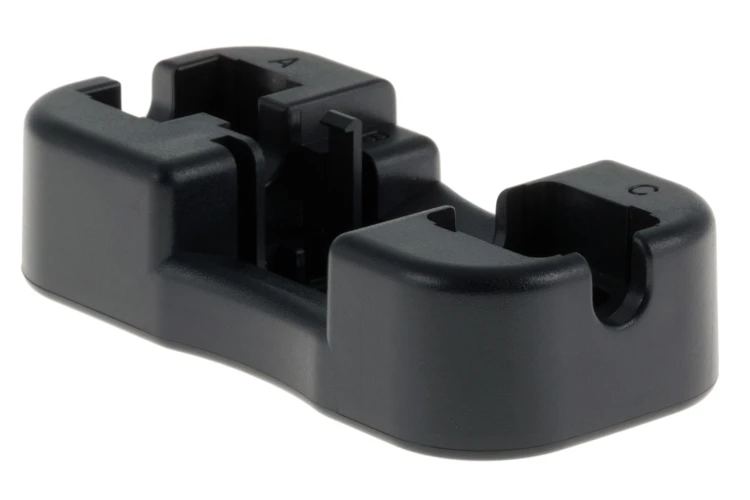
A Keystone Jack Termination Fixture is a tool specifically designed for the easy and efficient termination of network cables into keystone jacks. This product simplifies the often tricky task of connecting Ethernet cables, ensuring secure and accurate connections every time. It’s especially useful in structured cabling systems, where clean and reliable connections are crucial.
Tools and Materials Required
Before you jump in, make sure you’ve got the right tools for the job. Using the proper equipment not only makes the process smoother but also ensures your safety and the reliability of the connection. Here’s what you’ll need:
- Wire Strippers: Used to remove insulation without damaging the wire core.
- Pliers: Handy for bending or twisting wires during the termination process.
- Crimping Tool: Needed if you’re using the crimping method for termination.
- Keystone Jack Termination Fixture: Essential for accurate and efficient network cable terminations.
- Clamps: Essential for securing wires depending on your method.
- Insulation Tape or Heat Shrink Tubing: Protects the joint after the termination
- For mechanical termination: insert the wires into the connector and tighten it to secure the joint.
- For crimping: use the crimping tool to compress the connector onto the wire, making sure it’s secure.
- Using improper tools: Not using the right crimping tool or connector can lead to weak joints that fail over time.
- Over-stripping: Removing too much insulation can expose too much wire, increasing the risk of short circuits.
- Loose connections: This is a common problem that leads to poor performance or, in the case of electrical fixtures, safety hazards.
- Precision and Consistency: The fixture ensures each termination is precise, reducing the likelihood of errors and making sure your connections are secure.
- Ease of Use: Whether you’re a seasoned technician or new to the process, this tool simplifies what could otherwise be a time-consuming task.
- Wide Compatibility: It works with various keystone jacks, making it suitable for different project types, from home networks to commercial setups.
- Expert Picks: 4 Best Ethernet Cables for Gaming in 2024
- How to Default a Cisco 9300 Switch? Step-by-Step Guide
- What Are Copper Transceivers?